

📖 10 min read
My journey into the world of electronics began, like many, with a spark of curiosity. I remember being a kid, tinkering with old radios, utterly fascinated by the invisible waves that carried voices and music through the air. The idea of creating my own miniature broadcast station, even if just for my backyard, felt like a superpower. But the reality of building RF circuits, especially something as intricate as an FM transmitter, always seemed daunting. The fear of frying components, the cost of trial and error, and the sheer complexity of high-frequency design often kept me at bay. That was until I discovered the magic of simulation, and specifically, the power of Proteus FM transmitter simulation.
Proteus isn't just a software; it's a virtual laboratory, a sandbox where you can experiment, fail, and succeed without ever touching a soldering iron. It transformed my understanding of electronics, turning abstract concepts into tangible, observable waveforms. This article isn't just a technical guide; it's an invitation to embark on that same journey of discovery, to demystify RF circuits, and to design your very own FM transmitter, all within the safe confines of a simulator.
The Genesis of an Idea: Why Simulate an FM Transmitter?
The allure of the FM transmitter is undeniable. It's a device that takes an audio input – your voice, a song, a podcast – and transforms it into a radio wave, sending it across a short distance to be picked up by any standard FM receiver. For hobbyists, students, and engineers alike, it's a fantastic learning platform for understanding fundamental principles of radio frequency (RF) electronics, modulation, and antenna theory. But why simulate it when you could just build one?
The answer lies in the inherent challenges of real-world RF circuits. These circuits are notorious for their sensitivity to component tolerances, stray capacitances, and even the physical layout of the circuit board. A slight change in wire length or component placement can drastically alter performance, leading to frustration and wasted components. This is where simulation software like Proteus becomes invaluable. It allows you to:
- Experiment Freely: Change component values, alter circuit topologies, and test different modulation schemes without any physical cost.
- Visualize the Invisible: RF signals operate at frequencies far beyond what our eyes can perceive. Proteus provides virtual oscilloscopes, spectrum analyzers, and frequency counters, letting you "see" the waveforms, understand their behavior, and analyze their characteristics in detail. This is crucial for RF circuit design Proteus.
- Debug Systematically: Pinpoint issues like incorrect biasing, oscillation problems, or modulation errors before committing to a physical build.
- Learn Safely: Work with high frequencies and voltages in a risk-free environment.
For anyone asking, "How to simulate FM transmitter in Proteus?", the answer is that it provides an unparalleled platform for learning and experimentation, bridging the gap between theoretical knowledge and practical application.
Deconstructing the FM Transmitter: A Circuit Diagram Unveiled
Before we dive into the simulation, it's essential to understand the basic building blocks of an FM transmitter. Imagine it as a series of specialized stages, each performing a crucial task. When I first looked at an FM transmitter circuit diagram, it seemed like a jumble of components.

But breaking it down made all the difference:
- Audio Input Stage: This is where your sound source (a microphone, an MP3 player output) comes in. It often includes an amplifier (like a common emitter NPN transistor amplifier) to boost the weak audio signal to a usable level.
- Oscillator Stage: This is the heart of the transmitter, generating the high-frequency carrier wave. For an FM transmitter, this is typically a Voltage-Controlled Oscillator (VCO). The frequency of this oscillator changes based on the input voltage. Common configurations include Colpitts or Hartley oscillators.
- Modulator Stage: This is where the magic happens. The amplified audio signal is fed into the VCO, causing its output frequency to vary in proportion to the amplitude of the audio signal. This is Frequency Modulation (FM).
- Buffer/Amplifier Stage (Optional but Recommended): A buffer amplifier isolates the oscillator from the antenna, preventing load changes from affecting the oscillator's stability. A power amplifier might also be used to boost the signal strength before transmission.
- Antenna Matching Network & Antenna: Finally, the modulated RF signal is fed to an antenna, which radiates the waves into the air. A matching network ensures maximum power transfer to the antenna.
So, what components are needed for FM transmitter simulation? For a basic circuit, you'll typically need:
- Transistors: NPN general-purpose transistors like
BC547,2N3904, or2N2222for amplification and oscillation. - Resistors: Various values for biasing, current limiting, and voltage division.
- Capacitors: Electrolytic capacitors for coupling and decoupling, ceramic capacitors for RF bypassing and tank circuits. Variable capacitors (trimmers) are often used for fine-tuning the frequency.
- Inductors: Crucial for the oscillator's tank circuit, determining the carrier frequency.
- Microphone (or Signal Generator): To provide the audio input. In simulation, a function generator is used.
- Power Supply: A DC voltage source (e.g., 9V).
Understanding these blocks is the first step in answering "how to make FM transmitter" conceptually, even before touching the virtual wires.
Building Our Virtual Broadcast Station: Proteus ISIS FM Transmitter Design
Now, let's bring our theoretical understanding into the practical realm of Proteus. My first attempt at designing an FM transmitter circuit in Proteus was a mix of excitement and confusion. The key is to approach it systematically.
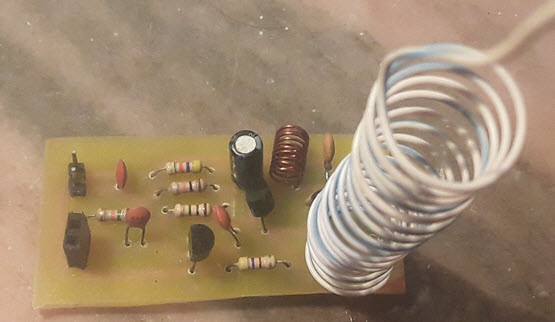
How to design FM transmitter circuit in Proteus? Here's a simplified roadmap:
- Launch Proteus ISIS: Open the schematic capture environment.
- Component Selection: Use the 'P' key to open the component picker. Search for and select the necessary components. For instance, search for 'BC547' for an NPN transistor, 'RES' for resistors, 'CAP' for capacitors, 'IND' for inductors. You'll also need a power source (
DC), ground (GROUND), and a signal generator (SINEorAUDIO GENERATORfrom the 'Generator Mode' palette) for your audio input. For an oscilloscope, select 'OSCILLOSCOPE' from the 'Virtual Instruments Mode' palette. - Place Components: Place the chosen components on the schematic workspace.
- Wire Connections: Connect the components according to your chosen FM transmitter circuit diagram. Pay close attention to power and ground connections. For RF circuits, keep connections short and direct where possible, even in simulation, as it helps reinforce good design practices.
- Set Component Values: Double-click each component to set its value (e.g., resistor values in ohms, capacitor values in farads, inductor values in henries). For the oscillator, the values of the inductor and capacitor in the tank circuit will determine your carrier frequency. A common starting point for a simple FM bug might be an inductor of a few turns (e.g., 0.1uH - 1uH) and ceramic capacitors in the picofarad range (e.g., 10pF - 100pF).
- Configure Input Signal: Place an
AUDIO GENERATORorSINEgenerator at your audio input. Set its frequency (e.g., 1kHz for a test tone) and amplitude (e.g., 100mV peak). - Connect Oscilloscope: Place an oscilloscope and connect its channels to key points: the audio input, the oscillator output, and the final RF output (before the antenna).
A simple common-emitter Colpitts oscillator forms the backbone of many basic FM transmitters. The audio signal can be coupled to the base of the oscillator transistor, causing its collector-emitter capacitance (or a varactor diode in more advanced designs) to change, thus varying the oscillation frequency. This is the essence of Proteus ISIS FM transmitter design.
The Magic of Modulation: Simulating FM in Proteus
Once your circuit is laid out, the real fun begins: observing the modulation. How does Proteus simulate RF circuits? Proteus uses advanced SPICE-based simulation engines capable of transient analysis, frequency domain analysis, and more. When you hit the 'Play' button (the triangular icon at the bottom of the Proteus window), the simulator calculates the voltage and current at every node over time, allowing you to visualize the dynamic behavior of your circuit.
To perform FM modulation simulation:
- Start Simulation: Click the 'Play' button.
- Open Oscilloscope: Double-click the virtual oscilloscope.
- Observe Waveforms:
- Channel A (Audio Input): You should see your low-frequency audio signal (e.g., a 1kHz sine wave).
- Channel B (Oscillator Output): This is where you'll see the high-frequency carrier wave. If the circuit is oscillating correctly, you'll see a steady sine wave at your desired FM frequency (e.g., 88-108 MHz if designed for the broadcast band, though Proteus's RF capabilities are better for lower RF frequencies or conceptual understanding rather than precise GHz design).
- Channel C (Modulated Output): This is the most exciting part. When the audio signal modulates the carrier, you won't see a change in amplitude (that would be AM), but rather a subtle "squeezing and stretching" of the high-frequency waveform. The frequency of the carrier wave will increase when the audio signal goes positive and decrease when it goes negative. This is the visual representation of FM.
- Frequency Analysis (Optional but insightful): While the oscilloscope shows time-domain behavior, a spectrum analyzer (if available in your Proteus version or via a third-party plugin) would show the carrier frequency with sidebands, confirming the FM modulation.
The key here is to observe the instantaneous frequency changes. If you zoom in on the modulated waveform, you'll notice that the number of cycles within a given time window changes in sync with the audio input's amplitude. This visual feedback is incredibly powerful for understanding the abstract concept of frequency modulation and is a direct answer to "How to simulate FM transmitter in Proteus?".
From Simulation to Reality: Practical Considerations and Real-World Applications
My simulation journey always felt incomplete without considering the real world. While Proteus is excellent for conceptual design and learning, translating a simulated FM transmitter into a physical one involves a few extra layers of complexity:
- Antenna Design: In Proteus, we often represent the antenna as a simple load. In reality, antenna length, type (e.g., whip, dipole), and impedance matching are critical for efficient radiation.
- Power Output and Range: A simple single-transistor FM transmitter will have a very limited range (a few meters). For longer ranges, additional RF power amplifier stages are needed, which also require careful design to avoid harmonic distortion.
- Component Tolerances: Real-world components have tolerances. A 100pF capacitor might actually be 95pF or 105pF, which can shift your carrier frequency. Using variable capacitors (trimmers) helps tune the final circuit.
- Parasitic Effects: Stray capacitance and inductance from PCB traces and component leads become significant at RF frequencies, often leading to unintended oscillations or frequency shifts. Careful PCB layout is paramount.
- Legal Implications: It's crucial to remember that broadcasting on licensed FM bands (like 88-108 MHz) without a license is illegal in most countries. Low-power FM transmitters (often called "FM bugs") are generally for very short-range, personal use and should operate at very low power to avoid interference. Always check local regulations.
Despite these real-world challenges, the knowledge gained from simulating an FM transmitter is directly applicable. It provides a solid foundation for understanding the principles, which can then be adapted for various applications: educational projects, short-range audio links (e.g., connecting an old MP3 player to a car stereo without an AUX input), or even just as a personal learning exercise in RF electronics.
